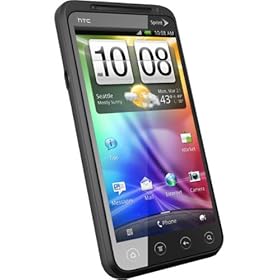
This is an archived blog about my history with the HTC Evo 4G from Sprint. The first "4G" device in the US. I may update with other HTC successors in the future.
Friday, June 8, 2012
The EVO Lives Again...
Sprint has once again revived itself from the poor showing of the EVO 3D to bring forth a true successor to the original EVO 4G. Whether it was a planned hiatus or if they really thought the 3D tech would woo many newbies to the company, a true EVO hero was no where to be found. Where the EVO Shift, EVO Design and EVO 3D all failed to bring the crowds back to the nation's 3rd largest cellular carrier, the new EVO 4G LTE is doing the trick rather nicely.
The EVO 4G LTE is not a device that I will personally be carrying in my pocket, as I have moved on to a new carrier and a new platform, but for many, it is a shining star that replaces those worn kickstand toting devices from long ago. As the Sprint version of the HTC One X, the EVO 4G LTE is quite an amazing piece of technology.
Facing a 4.7" display is amazing, but one with a 1280x720 resolution is downright wrong. The clarity, crispness and overall beauty of the screen is brilliant. The dual-core 1.5Ghz Snapdragon processor drives the Sense over-layed Android 4.0 OS easily and without any perceived lag. The 1GB of RAM might be a concern a year from now with the size of Android Apps, but worry about that later, for now, it's more than enough to work through the day. The 16GB of on-board storage is also augmented by a micro SD slot that will expand to 48GB without any issues.
While the hardware is excellent, the one problem that the EVO 4G LTE has is the lack of a network to support it. With Sprint's lowly 3G performance, usually in the 600kbps to 1Mbps downstream range, the EVO 4G LTE just seems mediocre. Hopefully Sprint will be able to start firing up some of the LTE markets sooner than later, but for those in WiMAX areas, that 2 year old EVO 4G will still smoke this new guy in terms of download speeds.
Tuesday, May 8, 2012
Virgin Mobile and Boost Mobile Bring Back The EVO
The EVO is returning, to a starring role in the next few weeks. Sprint MVNO carriers, Virgin Mobile and Boost Mobile are bringing back the EVO line in the form of the EVO V 4G (a rebranded EVO 3D) and an undecided new name for the EVO Design 4G. The EVO V 4G will be hitting Virgin Mobile shelves at the end of May. The Design will be hitting Boost locations about the same time.
While this may be an uninteresting point in the history of the EVO 4G, one has to appreciate that this means that the WiMAX network will hopefully be up a bit longer than originally thought. In any case, both devices will break with a $299.99 price tag on May 31st and with sub-$60 prices for unlimited plans from either carrier, the deal is a pretty great one.
Sunday, January 29, 2012
My Evo 4G is Retiring...
It is a sad day when I think about giving up my favorite phone that I have ever had. Not because I am getting something newer and more powerful, but to save a TON on my bill. Over the last 20 months, my EVO has been everywhere with me. Shooting video, taking amazing photos, and capturing my life in blogs, Facebook, Twitter and Email.
To give the quick history of what brought me to the EVO and what is now leading me from it isn't an easy thing to put down, but to make a very long story short, I started with WAP enabled devices running on AT&Tn 2002. I then moved to Verizon Wireless and the LG VX7000 feature phone tethered via Bluetooth to a Dell Axim X30. After a few months of carrying 3 or 4 devices, I moved to the Windows Mobile powered Motorola Q. After suffering through terrible battery life for a few months, Verizon was kind enough to let me have a new BlackBerry Pearl.
At this point, I was sold on the battery life, push notifications, and performance of the BlackBerry and in a few months the Storm was coming. Unfortunately, the Storm never really worked well and it was back to Windows Mobile and the amazing Touch Pro 2. From the TP2, a quick move was made to the Samsung Moment when I left Verizon for Sprint.
After 3 months with the incredibly underpowered Moment, a brand new EVO 4G was offered up and I took advantage of it. From that lovely June day onward, the EVO replaced my point and shoot digital, my video camera and even about 50% of what I used my laptop for.
Finally, 20 months later, Android apps just overwhelm the storage capacity, the OS is surprisingly buggy for a 2 year old device and most importantly, my Sprint bill continues to climb. So, off to a new experiement for me, and a savings of $50 a month...
Tuesday, December 20, 2011
Why The Evo 4G Is Dead
While it hasn't quite disappeared from Sprint stores yet, a startling realization is beginning to be found by Evo 4G users, both new and old... Apps have gotten BIGGER!
Unfortunately, as the progression or maybe even the evolution of Apps has happened, devices with limited internal storage are quickly becoming obsolete. Sure, there are options like Apps2SD or even the old just leave it stock, but if you truly want the unlimited experience, then you're going to need more than the 1/2 GB that the Evo 4G offers.
To round this out, keep in mind that the Evo 4G features 512MB of internal storage. Of this, about 1/2 is used by Gingerbread and Sense. This leaves around 250MB of App space. Half of this can be used up with just Google Maps (12MB), Google Docs (15MB), Google+ (30MB), Facebook (15MB) and Bejewelled 2 (50MB).
It might be time to finally root and remove that vintage bloatware that Sprint installed 2 years ago for newer options. Maybe just praying for that Evo 4G+ might work too...
Tuesday, November 29, 2011
Solving The White Reboot Screen
First off, it appears that the cause of the Sense reboot issue is caused by Apps being placed on the SD card. When the SD card is read, it launches the App and Sense is terminated. It appears that this is a safety mechanism built into the file system. Why it's built this way, we aren't sure, but we can tell you we have certainly solved the issue by understanding why it's doing it.
By placing only 'media centric' Apps on the card, we eliminate the common resets and only reset Apps that don't fit well in the internal storage. Google+, Hulu and Netflix are 3 pretty large Apps that will eat the EVO's memory all too quickly. When launching Apps from the card, realize that Sense will reboot and you will get the white screen.
When using daily Apps like Facebook, Foursquare or Twitter, make sure to keep those on the device memory. It's these hourly drivers that seem to cause the phone to kick off regularly and require Sense to restart. By keeping them in the device memory, we've eliminated the reset issue until we launch an App that is stored on our SD card.
So, store on the device as much as possible, but for those monsters that need that SD storage, just be aware that the reset is real and learn to expect it.
Monday, November 14, 2011
5 Minute App Review: Criticall
Are you one of those people that really likes to shut the volume off on your device overnight, but doesn't want to miss an emergency phone call? Well, the folks that programmed Criticall have your answer. Criticall allows you to silence your device except for those calls from people that you deem worthy to interrupt your sleep, quiet time or even just the times you don't want to deal with people.
Criticall works perfectly on our devices, takes seconds to set up and allows complete customization for those that need it. For those that wonder, night time isn't the only time to use Criticall. Movie theaters (for when the kids are home with the sitter and you have your phone silenced), business meetings, or even other 'less opportune' times for your phone to ring off the hook are great times to activate Criticall.
Criticall: 5 out of 5 stars - available free from Getjar or $.99 in the Android Market.
Thursday, September 29, 2011
Opinion Poll: What Sevices Do You Use From Your EVO?
We want to know the basics from 5 categories...
1) Photo Sharing
2) Video Sharing
3) Music/Entertainment STREAMING (playing from your SD card doesn't count)
4) Off Device File or Document Storage
5) Wild Card Apps - These can be used for STREAMING or Storage but may not fit into the categories above.
We've heard from quite a few users about the issues/praises that some services offer and so far the top recommendations are... Drumroll please...
1) Photo Sharing - Picasa (Google+), Flickr, Peep, Tweetcaster, Twitdroyd and Facebook
2) Video Sharing - Qik, YouTube and Facebook
3) Music/Entertainment STREAMING - Pandora, Amazon MP3, Music (upgraded for Google Music), Netflix, Hulu+ and Crackle
4) Off Device File or Document Storage - DropBox, Skydrive (via Sorami or other), GDocs (Google), Amazon Cloud and ZumoDrive
5) Wild Card Apps - FilesAnywhere (document storage and faxing from your device), Smaba Fileshare (access your device over a Wi-Fi connection in Windows), SendSpace File Transfer and aDownloader.
So, chime in below and let us know what you use!